If you have ever used a Masked Edit control, this control is for you! It's not "just" a masked edit control, it can replace a number of specialized data entry controls, such as date/time picker, IP address, file name entry and offers a number of unique features that you simply won't find in any other masked edit control.
This product includes both 32-bit and 64-bit controls for a seamless transition to pure 64-bit applications for managed .NET (C#, VB.NET) applications and C++/MFC applications.
 | |  |
| Currency input (with spin buttons) | | Numeric input (with spin buttons) |
| | | |
 | | 
 |
Telephone Number
Mask: ([m1-9]##) ###-####
Ext. 99999 | | Date and Time Sample using
$D and $T Mask |
It even doubles as a "regular" edit control, but it offers insert and overtype mode. A feature sorely missed in other edit controls.
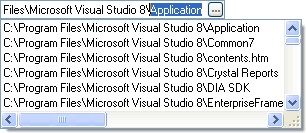
Autocomplete Sample
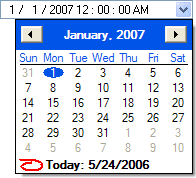
Date and Time in the same control (of course you could limit it to just the date or just the time)
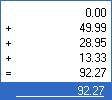
Popup Calculator (simply using +, -, * or / will invoke the calculator and overlay the input field)

Password Sample
Features
If you need easy to use data input with validation, SftMask/OCX has many features you can easily add to your applications:
- Date input with popup calendar
- Built-in popup calendar
- user-definable first day of week
- optional week numbers
- user event to highlight specific dates as the calendar is displayed
- definable minimum/maximum date
- Use the system's default date format or specify your own format
- Date value easily retrieved and set (as Date or Text value)
- Time input
- Use the system's default time format or specify your own format
- Time value easily retrieved and set (as Time or Text value)
- Autocomplete and suggest feature with complete application control
- Strings
- Files/Directories
- Insert/overtype mode
- Built-in error image handling with tooltips for errors and warnings
- Numeric data input (with formatting options and user-definable digits and fractions)
- Optional popup calculator
- popup window allowing intermediate calculations using +, -, *, /
- Numeric (integer) data input
- Optional spin buttons
- User-defined minimum/maximum range
- Masked input with predefined place holders and user definable character ranges
- Input mask can mix date, time, numeric input, mask and literals
- No need for a prompt character (but possible) as input fields can use a font which underlines the text. Literal (constant) data is not underlined
- Windows Themes support
- Built-in caption, simplifies caption and edit control alignment, reduces the number of controls on a form
- OLE drag & drop support
- Optional data-bound mode using ActiveX Data Objects (ADO)
- Left or right alignment
- Date/time, currency and numeric formatting functions
- Control can display user-defined text when it doesn't have the input focus
- Auto-advance to next control on the same dialog/form when data input is valid (our control actually works and doesn't get confused when the Shift key happens to be pressed)
- Tab key can optionally be used within the control to move between different fields (such as in a date or time value)
- Dual interfaces throughout for optimum performance
- UNICODE support
- ATL based control, no MFC DLLs or other DLLs required (COMCTL32.DLL may be required for popup calendar use)
- Not based on Windows Edit control class
The control can also be used as an enhanced single line edit control, as it offers the following improvements over a regular edit control:
- OLE drag & drop support with drop target display (insertion point)
- The selection can be defined by the application while retaining control over the caret location
- Optional auto-sizing of the control height based on the defined font, so text is never clipped
- User-definable colors for text background/foreground and text selection
- Built-in caption area, located on any side of the edit control

 On
On Off
Off